Getting your App Store screenshot sizes right is crucial. Upload the wrong dimensions, and App Store Connect will reject them. This guide covers every screenshot size you need for all Apple platforms — plus tips to save time. Last checked against Apple's specification on September 26, 2026. For the official requirements, see Apple's screenshot specifications. You can also check your files with our free screenshot validator before uploading them.
Cheat Sheet: Every Screenshot Size at a Glance #
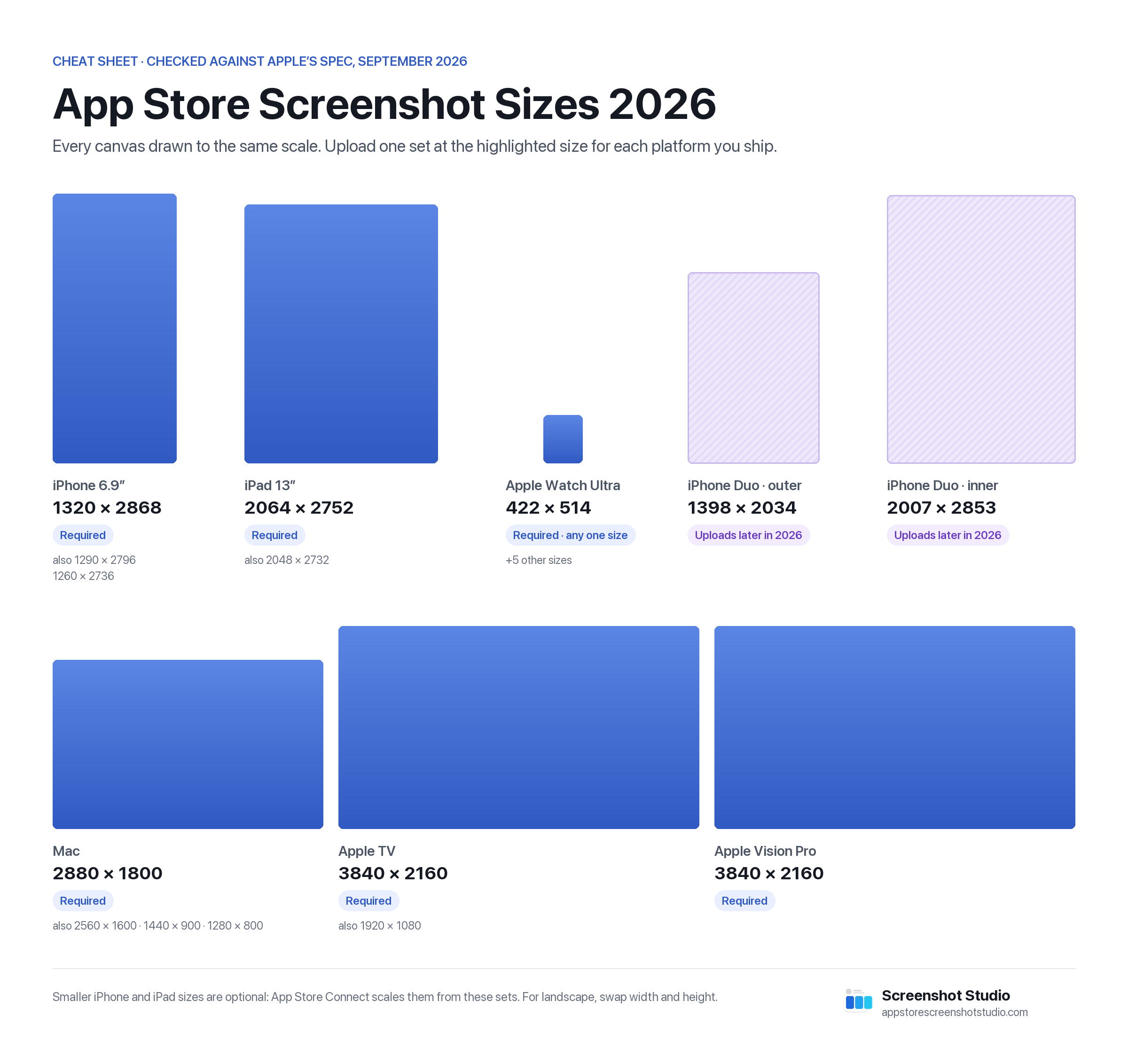
For each platform, the size to design for, the other sizes App Store Connect accepts, and whether you have to upload it at all:
Every canvas is drawn to the same scale, so you can compare them directly. Checked against Apple’s specification on 26 September 2026.
-
iPhone
Required1320 × 2868 px
Also accepted: 1290 × 2796 · 1260 × 2736
Upload one 6.9″ set. Smaller iPhones are scaled from it.
-
iPad
Required2064 × 2752 px
Also accepted: 2048 × 2732
Needed only if your app runs on iPad. Smaller iPads are scaled from it.
-
Mac
Required2880 × 1800 px
Also accepted: 2560 × 1600 · 1440 × 900 · 1280 × 800
Any 16:10 size. 2880 × 1800 is the sharpest.
-
Apple TV
Required3840 × 2160 px
Also accepted: 1920 × 1080
Required for Apple TV apps.
-
Apple Vision Pro
Required3840 × 2160 px
The only accepted size for visionOS apps.
-
Apple Watch
Required422 × 514 px
Also accepted: 410 × 502 · 416 × 496 · 396 × 484 · 368 × 448 · 312 × 390
Pick one size and use it in every language.
-
iPhone Duo
Uploads open later in 2026Outer display 1398 × 2034 px
Inner display 2007 × 2853 pxApple has published the sizes, but App Store Connect doesn’t accept Duo uploads yet. Details →
Use this cheat sheet
Free to use in your docs, blog posts and slides under CC BY 4.0. Please credit Screenshot Studio with a link to this page.
Find Your Device #
Not sure which display class a phone or iPad falls into? Search by model name or pixel size. The table covers every class in Apple's specification, older devices included.
| Display | Devices | Accepted sizes (portrait) | Requirement |
|---|---|---|---|
| iPhone 6.9″ |
iPhone AiriPhone 18 Pro MaxiPhone 17 Pro MaxiPhone 16 Pro MaxiPhone 16 PlusiPhone 15 Pro MaxiPhone 15 PlusiPhone 14 Pro Max | 1320 × 2868 1290 × 2796 1260 × 2736 |
Required |
| iPhone 6.5″ |
iPhone 14 PlusiPhone 13 Pro MaxiPhone 12 Pro MaxiPhone 11 Pro MaxiPhone 11iPhone XS MaxiPhone XR | 1284 × 2778 1242 × 2688 |
Only without a 6.9″ set |
| iPhone 6.3″ |
iPhone 18 ProiPhone 17 ProiPhone 17iPhone 16 ProiPhone 16iPhone 15 ProiPhone 15iPhone 14 Pro | 1206 × 2622 1179 × 2556 |
Optional · scaled from 6.5″ |
| iPhone 6.1″ |
iPhone 17eiPhone 16eiPhone 14iPhone 13 ProiPhone 13iPhone 13 miniiPhone 12 ProiPhone 12iPhone 12 miniiPhone 11 ProiPhone XSiPhone X | 1170 × 2532 1125 × 2436 1080 × 2340 |
Optional · scaled from 6.5″ |
| iPhone 5.5″ |
iPhone 8 PlusiPhone 7 PlusiPhone 6s PlusiPhone 6 Plus | 1242 × 2208 | Optional · scaled from 6.1″ |
| iPhone 4.7″ |
iPhone SE (3rd generation)iPhone SE (2nd generation)iPhone 8iPhone 7iPhone 6siPhone 6 | 750 × 1334 | Optional · scaled from 5.5″ |
| iPhone 4″ |
iPhone SE (1st generation)iPhone 5siPhone 5ciPhone 5 | 640 × 1136 640 × 1096 |
Optional · scaled from 4.7″ |
| iPhone 3.5″ |
iPhone 4siPhone 4 | 640 × 960 640 × 920 |
Optional · scaled from 4″ |
| iPhone Duo Outer display |
iPhone Duo | 1398 × 2034 | Uploads open later in 2026 |
| iPhone Duo Inner display |
iPhone Duo | 2007 × 2853 | Uploads open later in 2026 |
| iPad 13″ |
iPad Pro (M5, M4)iPad Pro (6th–1st generation)iPad Air (M4, M3, M2) | 2064 × 2752 2048 × 2732 |
Required |
| iPad 12.9″ |
iPad Pro (2nd generation) | 2048 × 2732 | Optional · scaled from 13″ |
| iPad 11″ |
iPad Pro (M5, M4, 4th–1st generation)iPad Air (M4, M3, M2, 5th–4th generation)iPad (A16, 10th generation)iPad mini (A17 Pro, 6th generation) | 1668 × 2420 1668 × 2388 1640 × 2360 1488 × 2266 |
Optional · scaled from 13″ |
| iPad 10.5″ |
iPad ProiPad Air (3rd generation)iPad (9th–7th generation) | 1668 × 2224 | Optional · scaled from 12.9″ |
| iPad 9.7″ |
iPad ProiPad AiriPad Air 2iPad (6th–3rd generation)iPad 2iPadiPad mini (5th generation)iPad mini 4iPad mini 3iPad mini 2 | 1536 × 2048 1536 × 2008 768 × 1024 768 × 1004 |
Optional · scaled from 10.5″ |
| Mac 16:10 |
Mac | 2880 × 1800 2560 × 1600 1440 × 900 1280 × 800 |
Required |
| Apple TV 16:9 |
Apple TV | 3840 × 2160 1920 × 1080 |
Required |
| Apple Vision Pro 16:9 |
Apple Vision Pro | 3840 × 2160 | Required |
| Apple Watch Ultra 4 / Ultra 3 |
Apple Watch Ultra 4Apple Watch Ultra 3 | 422 × 514 | Required |
| Apple Watch Ultra 2 / Ultra |
Apple Watch Ultra 2Apple Watch Ultra | 410 × 502 | Required |
| Apple Watch Series 12 / 11 / 10 |
Apple Watch Series 12Apple Watch Series 11Apple Watch Series 10 | 416 × 496 | Required |
| Apple Watch Series 9 / 8 / 7 |
Apple Watch Series 9Apple Watch Series 8Apple Watch Series 7 | 396 × 484 | Required |
| Apple Watch Series 6 / 5 / 4 / SE |
Apple Watch Series 6Apple Watch Series 5Apple Watch Series 4Apple Watch SE 3Apple Watch SE 2Apple Watch SE | 368 × 448 | Required |
| Apple Watch Series 3 / 2 / 1 |
Apple Watch Series 3Apple Watch Series 2Apple Watch Series 1 | 312 × 390 | Required |
| No match. Try a model name like “iPhone 15” or a pixel width like “1290”. | |||
Landscape uses the same sizes with width and height swapped. Mac, Apple TV and Vision Pro sizes are shown as landscape, their native orientation.
Quick Reference: All Screenshot Sizes #
Here's a complete table of the screenshot sizes App Store Connect accepts, and which ones are required:
iPhone Screenshots #
| Display class | Accepted portrait sizes (pixels) | Requirement |
|---|---|---|
| iPhone Duo | 1398 x 2034 (outer display) or 2007 x 2853 (inner display) | Not accepted yet; App Store Connect adds iPhone Duo uploads later in 2026 |
| 6.9" | 1260 x 2736, 1290 x 2796, or 1320 x 2868 | Primary set for iPhone apps |
| 6.5" | 1242 x 2688 or 1284 x 2778 | Required only when a 6.9" set is not provided |
| 6.3" | 1179 x 2556 or 1206 x 2622 | Optional; Apple scales from a larger class |
| 6.1" | 1080 x 2340, 1125 x 2436, or 1170 x 2532 | Optional; Apple scales from a larger class |
| 5.5" | 1242 x 2208 | Optional |
| 4.7" | 750 x 1334 | Optional |
Landscape screenshots use the same accepted sizes with width and height reversed. For a current iPhone app, provide one complete set in any accepted 6.9-inch size. App Store Connect derives the smaller display classes when you do not supply custom sets. For the phone-to-class mapping and which simulator produces which size, see the iPhone screenshot sizes guide.
New in September 2026: the iPhone 18 Pro Max joins the 6.9-inch class and captures at 1320 x 2868, so its native screenshots are a valid primary set. The iPhone 18 Pro joins the 6.3-inch class at 1206 x 2622. The iPhone Duo is not part of the 6.9-inch class: Apple lists it as its own entry, at 1398 x 2034 for the outer display and 2007 x 2853 for the inner display. The sizes are published, but App Store Connect doesn't accept iPhone Duo uploads yet; Apple says support will be available later this year. See the iPhone Duo screenshot sizes for details.
iPad Screenshots #
| Display class | Accepted portrait sizes (pixels) | Requirement |
|---|---|---|
| 13" | 2064 x 2752 or 2048 x 2732 | Required when the app runs on iPad |
| 11" | 1488 x 2266, 1640 x 2360, 1668 x 2388, or 1668 x 2420 | Optional; Apple scales from 13" |
| 10.5" | 1668 x 2224 | Optional |
| 9.7" | 1536 x 2008 or 1536 x 2048 | Optional |
Landscape screenshots use the corresponding reversed dimensions. An existing 2048 x 2732 iPad Pro set remains accepted for the current 13-inch class. For the device-to-class mapping and which simulator to capture from, see the iPad screenshot sizes guide.
Mac Screenshots #
| Display | Size (pixels) |
|---|---|
| Mac (16:10 aspect ratio) | 1280 x 800, 1440 x 900, 2560 x 1600, or 2880 x 1800 |
Apple accepts exactly these four sizes. 2880 x 1800 gives the sharpest result on Retina displays.
Apple Watch Screenshots #
| Device | Size (pixels) |
|---|---|
| Apple Watch Ultra 4 / Ultra 3 | 422 x 514 |
| Apple Watch Ultra 2 / Ultra | 410 x 502 |
| Apple Watch Series 12 / 11 / 10 | 416 x 496 |
| Apple Watch Series 9 / 8 / 7 | 396 x 484 |
| Apple Watch Series 6 / 5 / 4 / SE 3 / SE 2 / SE | 368 x 448 |
| Apple Watch Series 3 / 2 / 1 | 312 x 390 |
Use the same Apple Watch screenshot size consistently across every localization for the app.
Apple TV Screenshots #
| Resolution | Size (pixels) |
|---|---|
| 4K / 1080p | 1920 x 1080 |
| 4K (full) | 3840 x 2160 |
Apple Vision Pro Screenshots #
| Type | Size (pixels) |
|---|---|
| Standard | 3840 x 2160 |
How Many Screenshots Can You Upload? #
- Minimum: 1 screenshot per device size
- Maximum: 10 screenshots per device size
- Recommended: 4-8 screenshots that tell a compelling story
Screenshot Format Requirements #
All screenshots must meet these specifications:
- Format: PNG or JPEG (PNG recommended for quality)
- Color space: sRGB or P3
- No alpha/transparency: Fully opaque images only
- No rounded corners: Apple adds these automatically
Common Mistakes to Avoid #
1. Wrong Aspect Ratio #
Screenshots must match exact pixel dimensions. Even being off by a few pixels will cause rejection.
2. Including Device Bezels Incorrectly #
If you add device frames, ensure the inner screenshot matches the expected resolution.
3. Forgetting the Primary Sets #
Provide an accepted 6.9-inch iPhone set. If the app runs on iPad, also provide an accepted 13-inch iPad set. Smaller display classes can be scaled from those primary sets.
4. Low Resolution Exports #
Always export at the exact pixel dimensions — never upscale from smaller images.
The Easy Way: Use Screenshot Studio #
Manually creating screenshots for every device size is tedious and error-prone. The App Store screenshot generator in Screenshot Studio eliminates this pain:
- Auto-generates all required sizes from a single design
- Supports every platform: iPhone, iPad, Mac, Watch, TV, Vision Pro, and Android
- Exports in the correct format ready for App Store Connect
- Uploads directly to App Store Connect — no manual uploading
Instead of juggling dozens of export presets, design once and let Screenshot Studio handle the rest.
Conclusion #
Getting screenshot sizes right is a non-negotiable part of App Store submission. Bookmark this guide for quick reference, validate your finished files for free, or save yourself the hassle entirely with our app store screenshot generator. Ready to submit? See our step-by-step App Store submission guide.
👉 Download Screenshot Studio →