Mac App Store Screenshot Generator
A native Mac app built for developers who create App Store screenshots on the platform they already use.
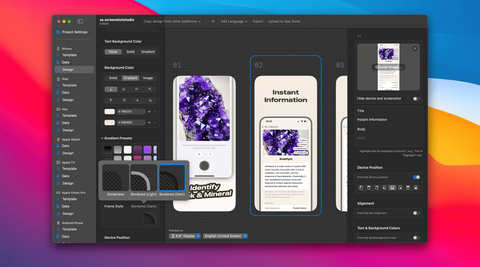
Screenshot Creation on macOS
Screenshot Studio runs natively on macOS 14+ with an editor purpose-built for App Store screenshot workflows — not a browser tab or general design tool.
Native Mac performance
Fast, offline-capable workflow integrated with your development environment.
Simulator-friendly imports
Import screenshots from the iOS simulator or device and compose store-ready marketing images.
Upload from your Mac
Push finished screenshots directly to App Store Connect without leaving the app.
Frequently Asked Questions
In one sentence, what makes Screenshot Studio different from other apps out there?
I created this app to address the pain of the App Store creation process. I want you to create screenshots as fast as possible while still making the result look professional. You might not see every fancy feature in this app, but I can guarantee the speed and beauty of it.
What is an App Store screenshot generator?
An App Store screenshot generator is a tool that turns raw app screenshots into polished, store-ready marketing images with correct dimensions, device frames, captions, and locales. Screenshot Studio is a native Mac and iOS app built for this workflow.
Can Screenshot Studio upload directly to App Store Connect?
Yes. Screenshot Studio uploads all screenshots for every platform and locale to App Store Connect in the correct order — eliminating manual drag-and-drop for each device size and language.
Which devices and platforms are supported?
Screenshot Studio supports iPhone, iPad, Mac, Apple Watch, Apple TV, Apple Vision Pro, and Android phones. Export or upload every required size from a single project.
How does AI localization work?
Screenshot Studio uses built-in AI translation to generate localized screenshot captions in any language — no API key required. You can review and edit translations per locale while keeping layouts consistent across markets.
Do I need design skills to use Screenshot Studio?
No. Screenshot Studio includes professionally designed templates and an editor built specifically for App Store screenshots. Most developers are productive within minutes.
How is Screenshot Studio different from Figma or web tools?
Unlike Figma or browser-based tools, Screenshot Studio is purpose-built for app store screenshot production — automatic sizing, AI localization, bulk export, and direct App Store Connect upload from a native Mac and iOS app.
What screenshot sizes does it export?
Screenshot Studio exports every required App Store and Google Play screenshot size for supported devices.
Is there a free version?
You can try all features for free and experience how easy it is. If you like it, we require payment for export.
Is there a one-time purchase option?
Yes. Pro comes as a weekly, monthly or yearly subscription, or as a one-time lifetime unlock.
Can I use Screenshot Studio with Claude Code or Cursor?
Yes. A built-in MCP server lets Claude Code, Cursor, VS Code, Codex, and Antigravity write your captions, import screenshots, change the design, and render a preview in your open document. It is available on the free tier and runs entirely on your Mac — the assistant connects over localhost and nothing is uploaded.